

Skip to content
masiva

Official WhatsApp Business API for businesses

Inform, promote and build loyalty from a secure, Meta-approved number with your company name and logo. Handle thousands of conversations with several agents and an AI chatbot in a single inbox, with the WhatsApp Cloud API: no bans, no rotating numbers and no lost customer history.

Official Meta infrastructure Activation in minutes Local invoicing in Ecuador REST API for your integrations
A secure, Meta-approved WhatsApp number sending campaigns to thousands of customers through Meta's official API, with delivered messages and replies in real time
  • Secure official Meta number
  • Bulk campaigns
  • Several agents, one number
  • AI-powered
Features

What you can do with the official API

The WhatsApp Business app on your phone works for a small business. If you want to scale or you serve hundreds or thousands of customers, you need the WhatsApp API, Meta's official enterprise solution that gives you control over all your communications. Here is what you get:

Official bulk campaigns

Send promotions, notices and reminders to your entire contact list with Meta-approved templates. No risk of bans, and with your company name approved by Meta.

Several agents, one number

Your whole team works from the same inbox, with assigned conversations, internal notes and supervision. No chat gets lost.

AI chatbot included

Answers FAQs, checks balances or books appointments automatically, and hands off to a person when needed. See chatbots and AI agents

Real-time reports

Messages sent, delivered, read and replied to, by campaign and by agent. Everything you need to report to management.

Integration with your systems

REST API and webhooks to trigger messages from your core system, CRM or ERP: confirmations, passcodes, account statements and alerts.

Ready-to-use modules

Surveys, forms, bookings, a catalog with orders, tags, custom fields and a Kanban-style sales pipeline.
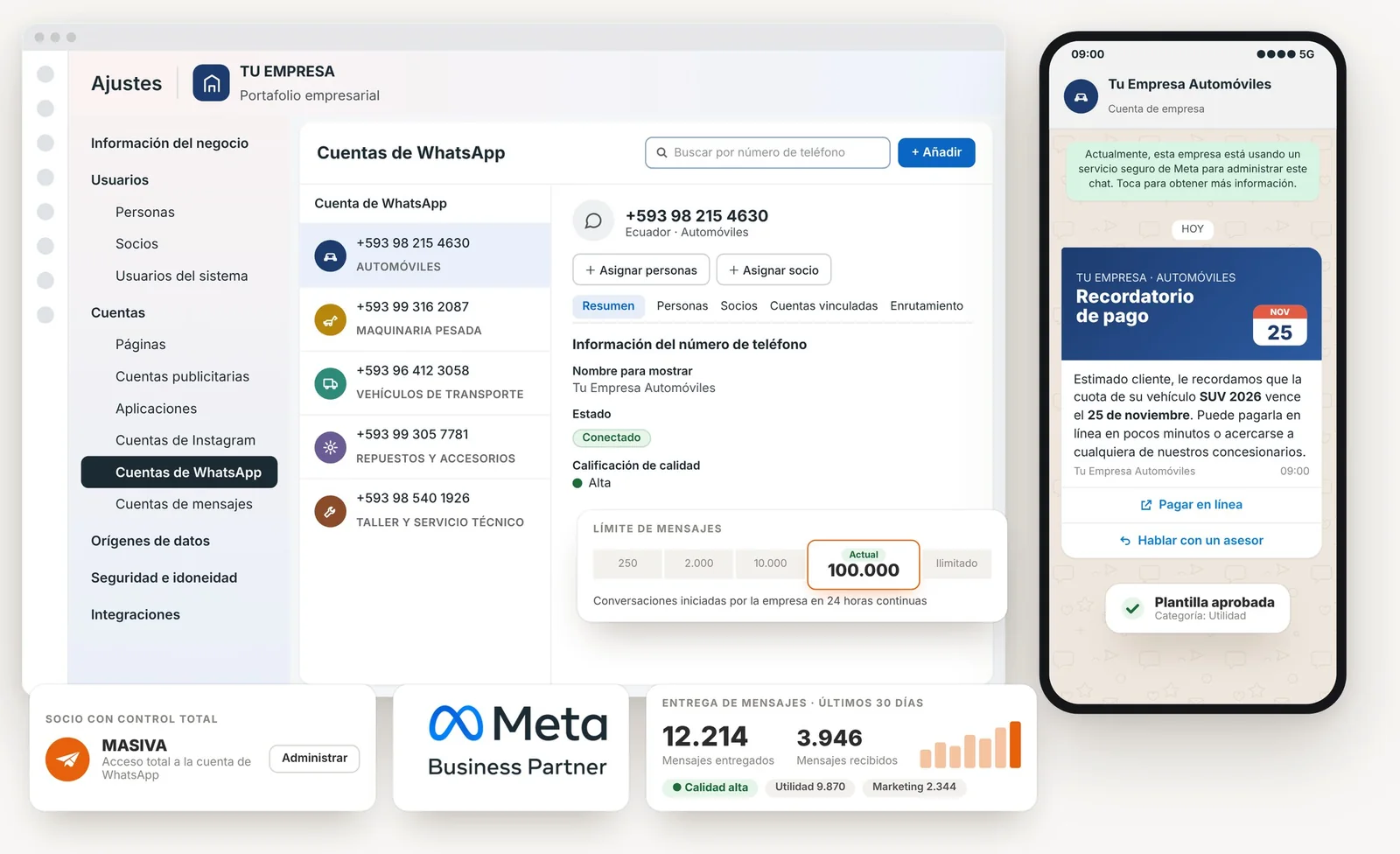
Official WhatsApp API dashboard: numbers from several business lines of one company connected, Meta's secure service notice in the customer chat, high quality rating, a 100,000-conversation limit, a delivered-messages report and a payment reminder with an approved template on the customer's phone
Use cases

Use cases already working in Ecuador

Each one with its own templates, flows and reports. Pick yours or combine them.

Operational notifications

Order, appointment, queue and delivery confirmations, triggered from your system through the API.

Member and customer service

Balance inquiries, account statements and requests resolved by the bot; complex cases go to an agent.

Early collections

A reminder before the due date with a payment button and automatic receipt confirmation.

Campaigns and loyalty

Promotions segmented by tag, with response and conversion tracking.

Businesswoman in a Quito café checking her customers' WhatsApp conversations on her phone, handled by the bot and her team
Why the official channel

No bans, no need for a phone that stays on, and an AI that serves customers for you 24/7

Tools that "automate" the regular WhatsApp app break Meta's policies: sooner or later the number gets banned, and with it your contact list and history. The official API is the route Meta designed for businesses.

  • Official business profile, with a Meta-approved name, logo and contact details
  • Templates reviewed by Meta before they are sent
  • Deliveries with backup and full traceability
  • Your data complies with Ecuador's Personal Data Protection Law
MASIVA consultant supporting a company's customer service team in Quito as they answer WhatsApp chats from a single inbox

What the implementation includes

  • Creating or verifying the Meta business portfolio in your company's name
  • Activating the number on the official API
  • Guidance on writing and categorizing your templates
  • Setting up the inbox, users and roles for your team
  • Designing the chatbot and AI flows
  • Training and ongoing support in Ecuador
Activate my official number
How pricing works

A clear structure, no fine print

We work with corporate plans tailored to your volume and your team. The proposal details three components so there are no surprises:

  1. Implementation: a one-time fee to activate and launch the service.
  2. Platform subscription: a fixed monthly fee for the system, your team's users and the chatbot.
  3. Meta fees: what Meta charges for each template sent (marketing, utility or authentication), paid by your company directly to Meta according to its current rate card.

Request your proposal with these details

That way we reply the same business day with concrete numbers:

  • How many contacts you have and how many messages you send per month
  • How many people will handle the number
  • What you want to automate first (collections, service, appointments, sales)
  • Whether you need to connect any in-house system
Request a proposal
One-off sends

Need a one-off bulk send through the WhatsApp API?

We can help even if you do not have an active account with us. First we get your message officially approved by Meta and check that your contact list meets its policies; then we send your message and give you the delivery and read report.

Sends aligned with Meta's policies. We only work with contact lists whose contacts agreed to receive messages from your company; we do not send spam.

Already using the WhatsApp API with another provider?

If you pay for your platform abroad, with no local invoice and ticket-based support, switch to MASIVA without starting from scratch. We help you migrate your number, and you get invoicing in Ecuador, personalized support, competitive pricing and access for your whole team.

I want to switch to MASIVA
Common questions

Frequently asked questions

What is the difference between the WhatsApp Business app and the official API?
The free app is designed for a small business working from one phone. The official API is the enterprise version: several agents on the same number from one platform, campaigns with Meta-approved templates, chatbots and connection to your systems. It does not depend on a phone that stays on.
Can my number be banned for sending campaigns?
Not with the official API. Campaigns are sent with templates reviewed by Meta, through the channel Meta designed for businesses. Bans happen when unofficial tools are used to automate the regular app.
How much does it cost to send WhatsApp messages?
Meta charges for each outgoing message according to its current rate card by country and category (marketing, utility, authentication or service), and your company pays it directly from its business portfolio. Our proposal details the implementation, the subscription and those fees.
Can I keep using the number on my phone?
No. A number active on the official API is handled from the platform (web and mobile app), with your whole team. If you use that number in the app today, we migrate it; if you prefer, we activate a new one.
What do I need to get started?
A phone number that is not active in the WhatsApp app, a Meta business portfolio in your company's name (we help you create or verify it) and the text of the messages you want to send. If your business portfolio is already verified, activation takes minutes; if not, one week at most.
Who writes the templates?
Your team, with our guidance on categories and best practices so Meta approves them the first time. We build the automation flows and the chatbot.

Activate the official WhatsApp API for your business

Tell us who you message and how much you send. We will send you a corporate proposal the same business day, with a demo built on your own use cases.